← Back to portfolio
📋 UX Case Study

PokéCreative

A gamified creative-request portal that turned a dull, spreadsheet-driven design workflow into a playful Pokémon-themed experience the whole Events team actually enjoys using.

Role: UX + Design + Build
Timeline: 2 weeks
Team: Solo (AI-assisted)
Status: Live · In use
1
Portal, zero spreadsheets
20+
Team trainers onboarded
4
Asset request types
100%
Requests in one place
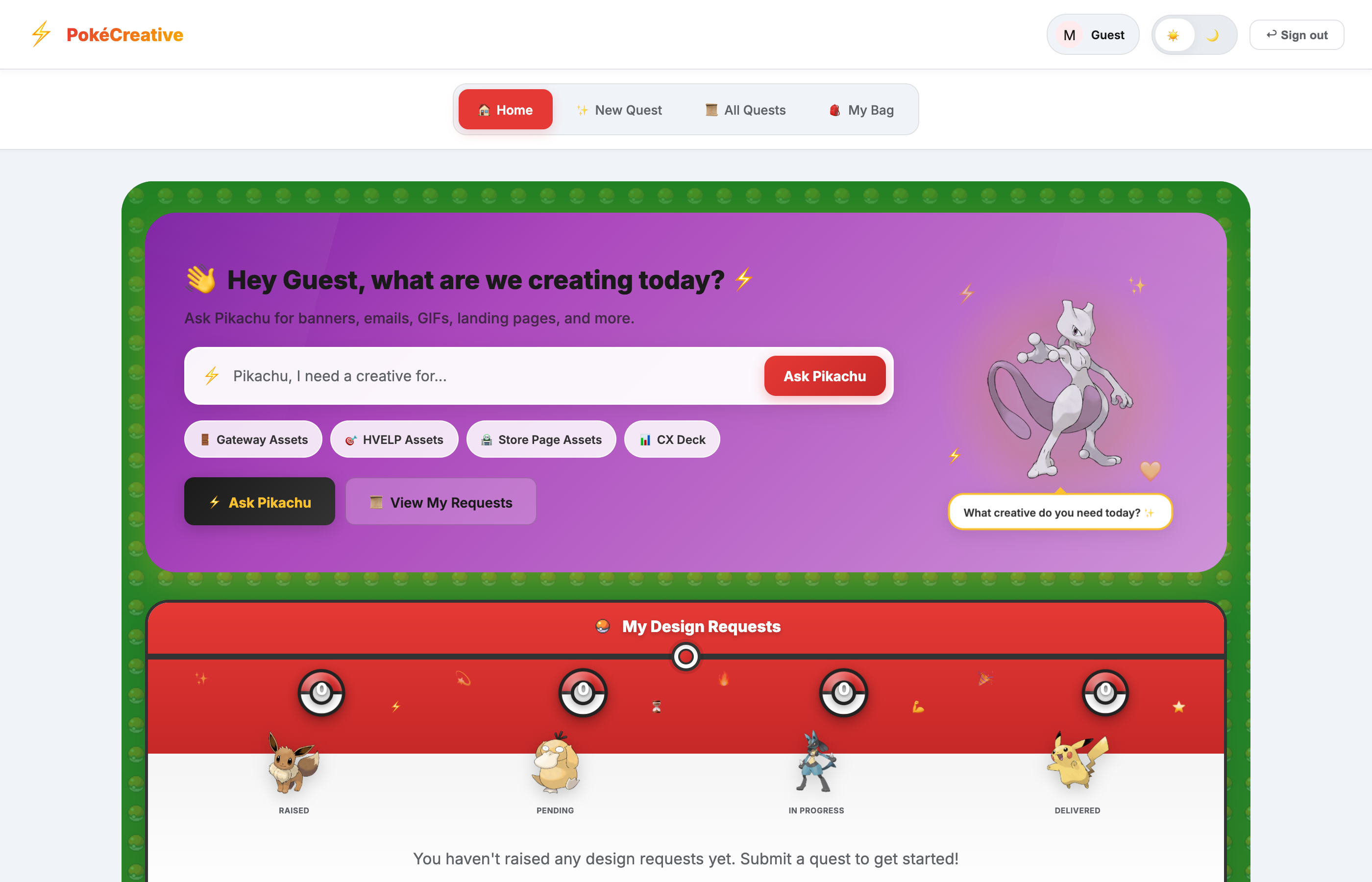
PokéCreative dashboard
LIVE & INTERACTIVE

Try it right here — it's real.

This isn't a mockup. The window below is the actual live app running — log in with admin / admin and click around. Or open it full-screen in a new tab.

Open full app ↗
🔍 Problem Space

Design requests were a mess.

😤 The Pain

Creative requests came in from everywhere — Slack, email, hallway chats, random spreadsheets. Nothing was tracked, priorities were unclear, and things slipped through the cracks.

🔄 The Loop

"Did you get my request?" "What's the status?" "Who's working on this?" — designers spent as much time chasing context as actually designing.

🎯 The Opportunity

What if every request lived in one place, with clear status, owner, and priority — and the whole thing felt fun instead of like filing a ticket?

✅ The Hypothesis

A single, delightful, gamified portal would get the team to actually adopt it — turning a chore into something people want to use.

↓ why gamify it?
🧪 Research & Discovery

Why people avoid request tools.

👥 Team Feedback

The team had tried generic ticketing tools before — they felt corporate and boring, so nobody kept them updated. The data went stale within a week.

📊 Pain Points

• Requests scattered across 4+ channels
• No single source of truth
• Unclear ownership & priority
• Zero visibility into status
• Tools felt like a chore

🗺️ The Insight

Adoption is the whole game. A perfectly logical tool that nobody enjoys using fails. Delight and personality drive people to actually keep it alive.

💡 The Theme

Pokémon: every teammate becomes a "trainer" with their own card, requests become "quests," and an assistant named Pikachu helps route them. Work, disguised as play.

↓ a tour of the portal
🖥️ Interface Walkthrough

A tour of the portal.

From login to quest — every screen leans into the Pokémon theme. Pick a part to explore it.

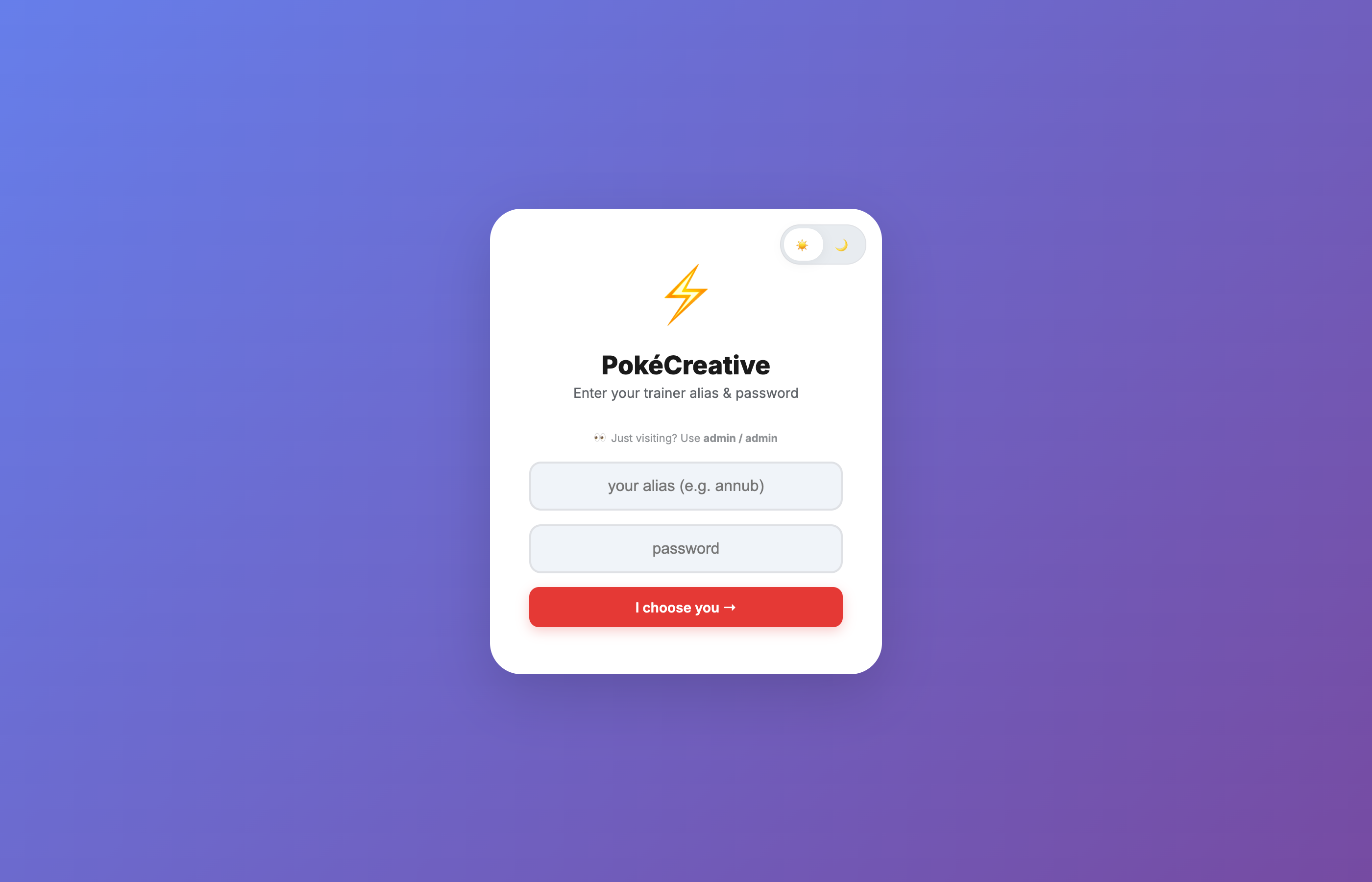
PokéCreative login screen
01 · Login

"I choose you"

Sign in with your trainer alias — the theming starts at the front door. Guests can peek with a shared demo account.

  • Trainer alias + password
  • Guest mode (admin / admin)
  • Light / dark theme toggle
  • Playful copy from step one
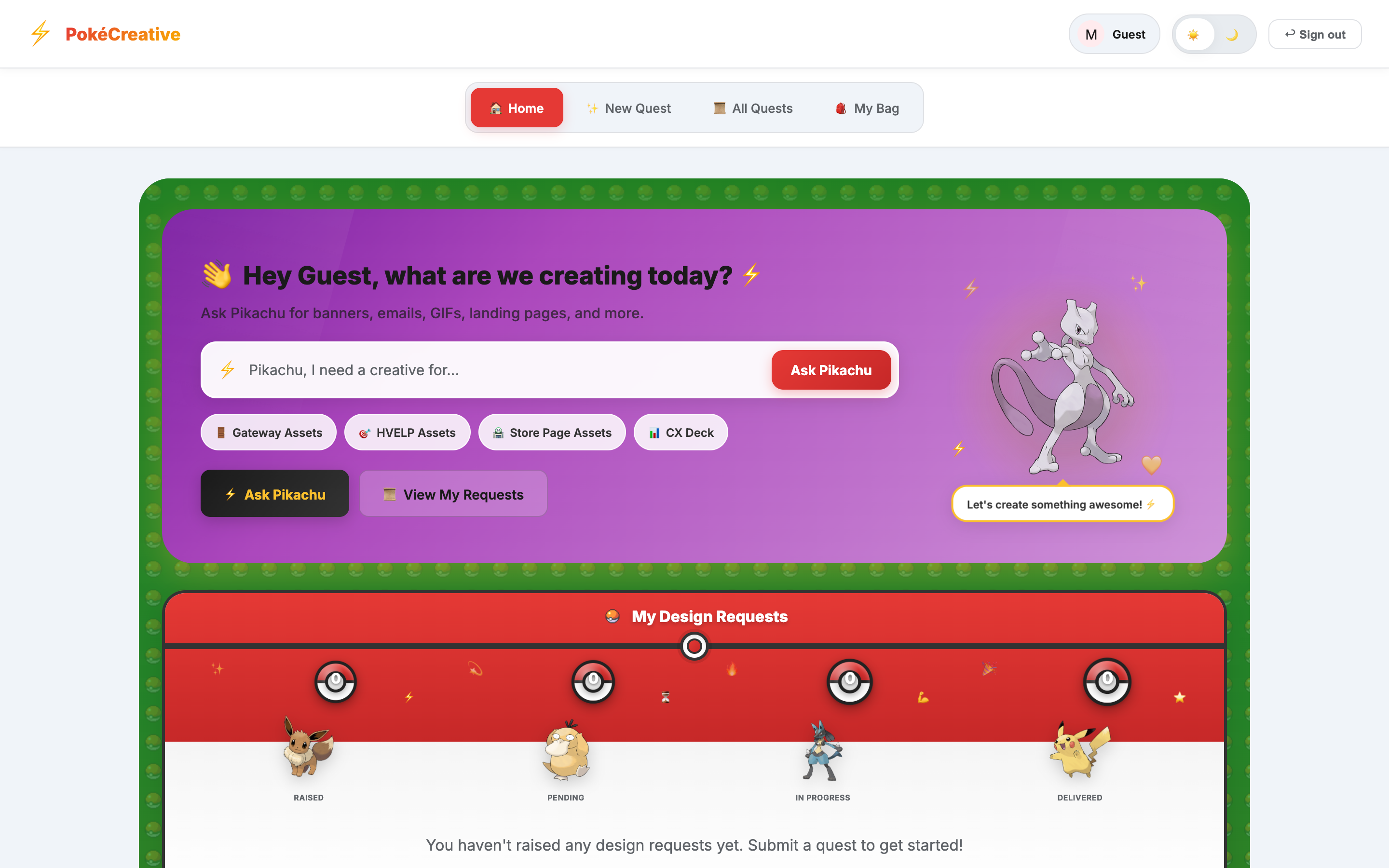
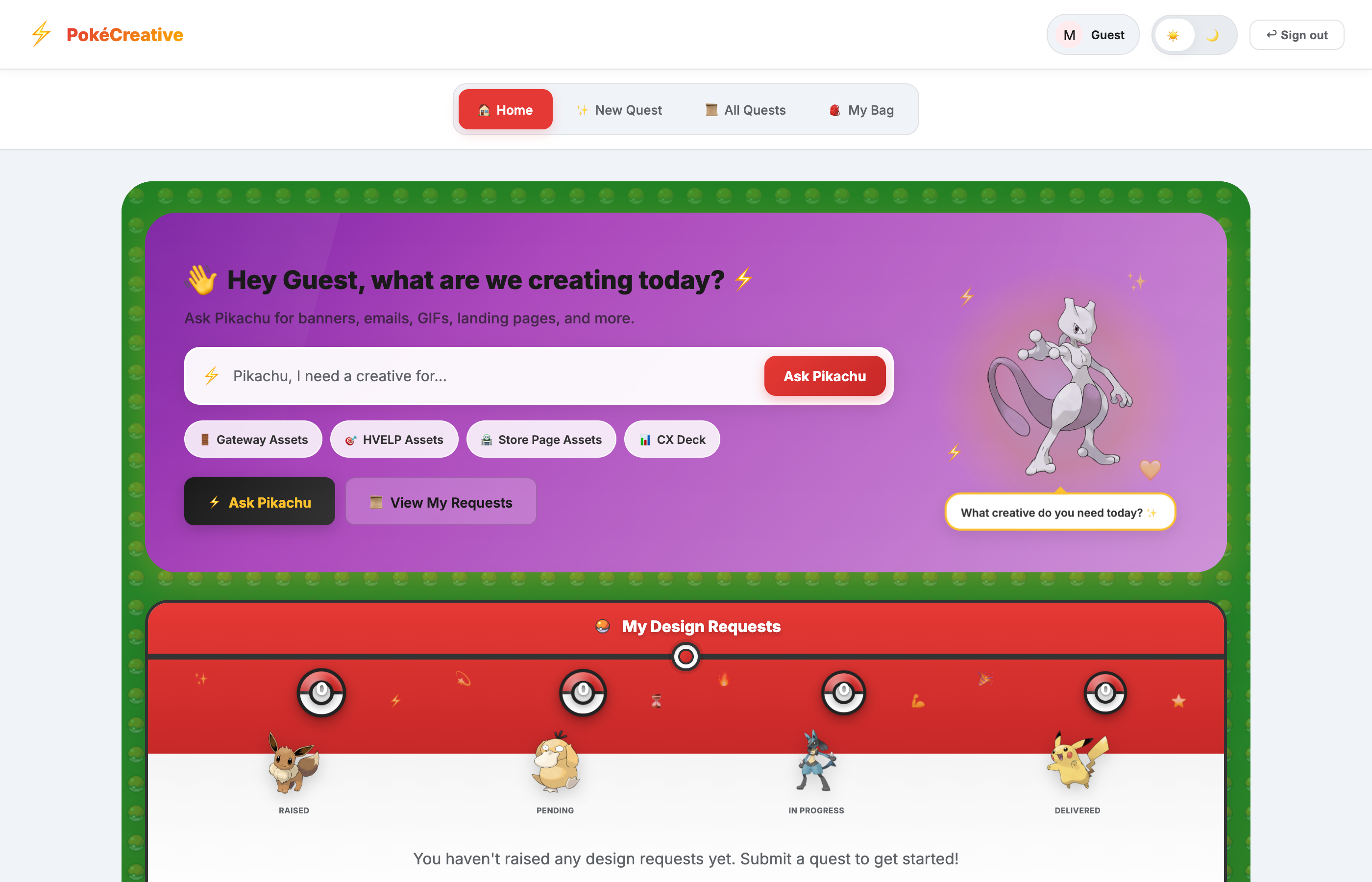
PokéCreative home dashboard
02 · Home

Everything at a glance

The landing hub — ask the assistant for a creative, jump to your requests, and see the whole team at once.

  • "Ask Pikachu" request bar
  • Quick asset-type chips
  • View my requests
  • Home / Quest / Bag nav
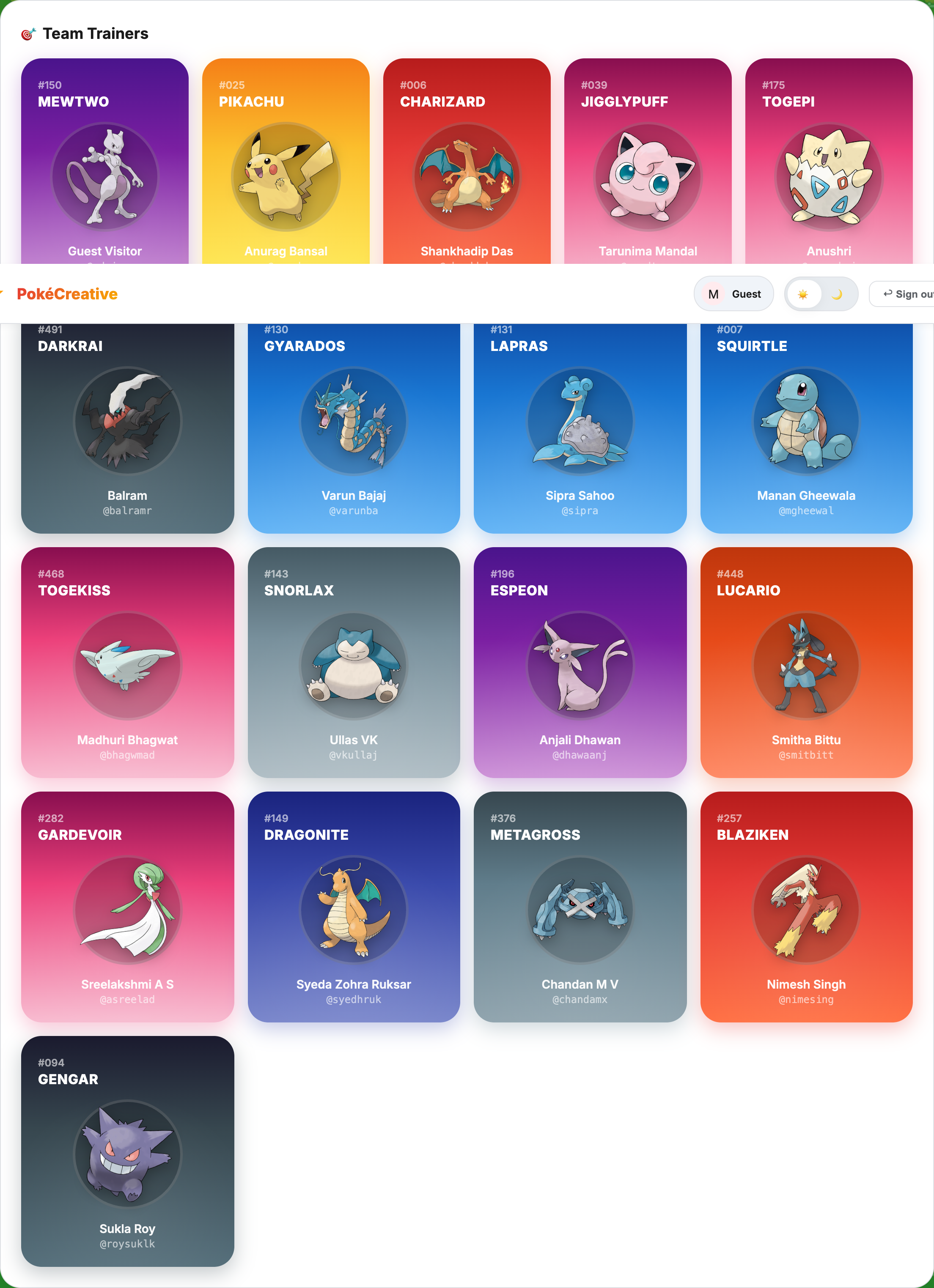
Team trainer cards
03 · Team Trainers

Everyone's a trainer

Each teammate gets their own collectible Pokémon card — name, alias, and a signature Pokémon. It's the detail that makes people smile and stick around.

  • Personalized card per member
  • Type-colored card styling
  • Admin can add trainers
  • Instant sense of belonging
New quest request form
04 · New Quest

Requests become quests

Filing a creative request feels like starting a quest — title, dimensions, deadline, and priority, captured in a clean, friendly form.

  • Title, dimensions, deadline
  • Priority levels
  • Admin deploy & assign
  • Direct file delivery
All quests view
05 · All Quests

One board, full visibility

Every request in one place, filterable by status and priority. No more "did you get my message?" — the whole team sees what's happening.

  • Filter by status & priority
  • Search across quests
  • Clear owner & deadline
  • Single source of truth
↓ key features
✨ Key Features

What makes it click.

Pick a capability to explore it. One focused view at a time.

🎴

Trainer Cards

Every team member gets a personalized, collectible Pokémon card — the signature detail that makes the whole tool feel like it's theirs.

  • One card per member
  • Type-colored styling
  • Alias + Pokémon
  • Admin can add trainers
01 / 06

Ask Pikachu

A friendly assistant bar to kick off a request in plain language, with quick chips for common asset types so nobody stares at a blank form.

  • Natural-language request
  • Quick asset-type chips
  • Guided quest creation
  • Zero learning curve
02 / 06
📜

Quest Board

Every request in one filterable board — status, priority, owner, and deadline visible at a glance. The single source of truth the team was missing.

  • Filter by status & priority
  • Search across quests
  • Clear ownership
  • Live status tracking
03 / 06
🎯

Deploy & Assign

Admins route quests to the right trainer, attach deliverables, and mark them delivered — closing the loop entirely inside the portal.

  • Assign to a trainer
  • Attach & deliver files
  • Status transitions
  • Admin-only controls
04 / 06
🌙

Dark / Light Mode

A full theme toggle for comfortable sessions, with the choice remembered across visits.

  • One-tap toggle
  • Available from login
  • Persists via localStorage
  • Smooth transitions
05 / 06
🎮

Gamified UX

Trainers, quests, and a mascot turn an admin chore into something people genuinely enjoy — which is exactly what drives adoption.

  • Playful theme throughout
  • Friendly microcopy
  • Sense of ownership
  • Runs fully in-browser
06 / 06
↓ the journey
📅 Project Timeline

From idea to live in 2 weeks.

Tap through each phase to see what happened.

DAYS 1-2 — Concept & Theme

Turning a chore into a game

Framed the core problem — nobody adopts boring request tools — and landed on the Pokémon "trainers & quests" metaphor. Sketched the flows and the card concept.

DAYS 3-6 — Core Build

Auth, quests & the board

Built login, the quest creation form, and the filterable quest board with status and priority — the functional backbone of the portal.

DAYS 7-10 — Personality

Trainer cards & Ask Pikachu

Added the collectible team trainer cards, the "Ask Pikachu" assistant bar, admin deploy & assign, and the light/dark theming that gives it character.

LAUNCH — Ship to the team

Live on Netlify

Deployed the portal, onboarded the Events team as trainers, and started routing real creative requests through quests instead of scattered chats.

ONGOING — Iterate

Refining from real use

Tweaking flows and adding trainers as the team grows — keeping the tool fun enough that people actually keep it updated.

↓ results
📈 Impact & Results

Before & after.

😵 Before PokéCreative

• Requests across Slack, email & docs
• No single source of truth
• Unclear ownership & priority
• Tools felt like a chore
• Data went stale fast

🎉 After PokéCreative

• Every request in one portal
• Clear status, owner & deadline
• A tool the team enjoys using
• Higher adoption = better data
• Personality that fits the team

↓ reflections
🧠 Learnings & Reflections

What I'd tell past-me.

🎮 Delight drives adoption

The "logical" version of this tool already existed and nobody used it. Personality and fun were the actual feature that got the team on board.

🎯 Theme with restraint

The Pokémon theme had to enhance, not obstruct. Every playful touch still had to make the task faster, not slower.

🚢 Ship to real users fast

Getting it in front of the team in two weeks surfaced what actually mattered far quicker than more planning would have.

Try PokéCreative ↗    ← Back to portfolio